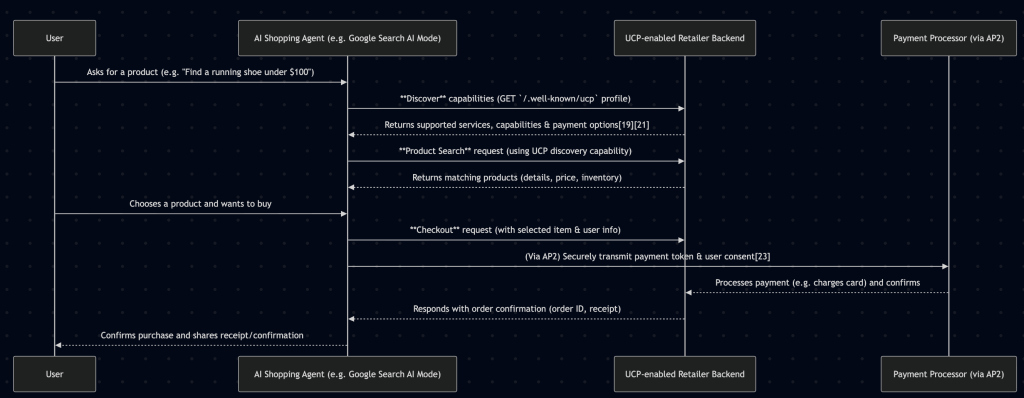
The agentic commerce conversation has exploded. Google launched the Universal Commerce Protocol (UCP). OpenAI proposed the Agent Commerce Protocol (ACP). Shopify rolled out agentic storefronts. Every protocol assumes the same thing: that the store on the other end can accept structured product queries and return matching results.
But here is the question nobody is answering at the store level: how do you actually translate “red Nike running shoes under €100 in size 42” into a valid Magento 2 GraphQL filter with resolved internal option value IDs?
This is not a prompt engineering problem. It is not a search relevance problem. It is a translation problem — bridging the gap between how humans describe what they want and the precise, ID-based filter syntax that Magento’s GraphQL API demands.
In our previous article on agentic e-commerce with MCP, we explored the protocol layer — how AI agents communicate with commerce systems. This article goes deeper into the implementation layer: the actual NL-to-filter resolution pipeline we built as an open-source Go middleware.
The Translation Problem Nobody Is Solving
AI-powered shopping is no longer theoretical. A 2024 Salesforce survey found that 39% of global consumers had already used generative AI for shopping inspiration, and Bain & Company projects that AI-influenced online sales could reach 25% of total e-commerce revenue by 2026. Gartner estimates that by 2025, 75% of B2B sales organizations will augment traditional playbooks with AI-guided selling solutions.
The infrastructure for agentic commerce is forming rapidly. Google’s UCP defines a universal language for agents to discover, compare, and purchase products across any merchant. The implicit requirement at every layer of these protocols is that the merchant’s system can accept a structured product query and return accurate results.
For Magento 2 stores, this means GraphQL. Specifically, the products query with its filter argument. And this is where the gap appears.
Consider a straightforward customer query:
“I’m looking for red Nike running shoes, size 42, under a hundred euros”
A human understands this instantly. Five constraints: brand (Nike), category (running shoes), color (red), size (42), price (under €100). But Magento’s GraphQL API does not understand natural language. It requires a filter object where every value is an internal option ID, not a human-readable label.
“Red” is not "red" in the filter. It is "52" — the option value ID assigned to the red swatch in that specific store’s attribute configuration. “Nike” is not "Nike". It is "43". Every store has its own mapping. There is no universal lookup table.
This is the translation problem. And it is the bottleneck preventing Magento 2 stores from participating in the agentic commerce wave.
Magento 2 GraphQL: Powerful but Rigid
Magento 2’s GraphQL API is genuinely capable. The products query supports filtering by any indexed attribute, sorting by multiple fields, and pagination. For a developer who knows the schema, it is an excellent API.
Here is what a properly constructed product query looks like:
query {
  products(
    filter: {
      brand: { eq: "43" }
      price: { from: "0", to: "100" }
      color: { eq: "52" }
      size: { eq: "167" }
      category_id: { eq: "28" }
    }
    sort: { relevance: DESC }
    pageSize: 20
  ) {
    items {
      name
      sku
      url_key
      price_range {
        minimum_price {
          regular_price { value currency }
          final_price { value currency }
        }
      }
      image { url label }
    }
    total_count
    page_info { current_page total_pages }
  }
}
Notice the filter values. Every single one is an opaque identifier:
brand: { eq: "43" }— “43” is the internal option ID for “Nike” in this storecolor: { eq: "52" }— “52” maps to “Red” in this store’s color attributesize: { eq: "167" }— “167” is the option ID for size “42”category_id: { eq: "28" }— “28” is the category ID for “Running Shoes”
These IDs are store-specific. A different Magento installation might use "7" for red, "112" for Nike, and "89" for size 42. There is no standard mapping. The IDs are assigned by MySQL’s auto-increment when a store admin creates attribute options.
This is why you cannot simply pass natural language to the GraphQL API. And it is why standard search extensions — Elasticsearch, Algolia, Klevu — solve a different problem. They optimize keyword relevance and ranking. They do not translate natural language into resolved filter objects. An AI agent does not need “the best search results for ‘red Nike shoes’.” It needs a structured filter that returns exactly the products matching all five constraints simultaneously.
Architecture: The Middleware Approach
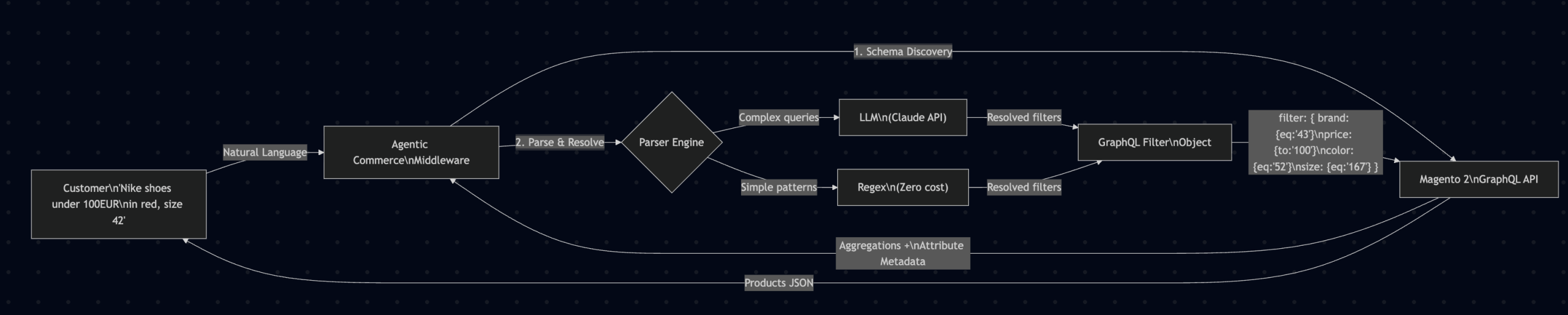
We built a middleware that sits between the natural language input (from a customer, a chatbot, or an AI agent) and the Magento 2 GraphQL API. It handles the entire translation pipeline: schema discovery, natural language parsing, option value resolution, and filter construction.
Here is the complete architecture:
The key insight is that the middleware never touches the Magento codebase. It communicates exclusively through the standard GraphQL API using an integration token. This means zero Composer packages, zero deployments, zero version compatibility concerns.
Schema Discovery: The Foundation of Everything
Before the middleware can translate anything, it needs to understand the store’s attribute landscape. Which attributes are filterable? What are their option values? What are the internal IDs?
We solve this with two GraphQL queries that run once on startup and are cached for subsequent requests.
Query 1: Aggregation Discovery
The first query retrieves every filterable attribute along with all available option values and their product counts:
query {
  products(search: "", pageSize: 1) {
    aggregations {
      attribute_code
      label
      count
      options {
        label
        value
        count
      }
    }
  }
}
This single query returns the complete filterable attribute map for the store. The response looks like this (abbreviated):
{
  "data": {
    "products": {
      "aggregations": [
        {
          "attribute_code": "color",
          "label": "Color",
          "count": 8,
          "options": [
            { "label": "Red", "value": "52", "count": 143 },
            { "label": "Blue", "value": "53", "count": 97 },
            { "label": "Black", "value": "49", "count": 312 }
          ]
        },
        {
          "attribute_code": "brand",
          "label": "Brand",
          "count": 24,
          "options": [
            { "label": "Nike", "value": "43", "count": 287 },
            { "label": "Adidas", "value": "44", "count": 195 }
          ]
        },
        {
          "attribute_code": "size",
          "label": "Size",
          "count": 15,
          "options": [
            { "label": "40", "value": "165", "count": 201 },
            { "label": "41", "value": "166", "count": 198 },
            { "label": "42", "value": "167", "count": 210 }
          ]
        }
      ]
    }
  }
}
Notice the critical data here: each option has both a human-readable label (“Red”, “Nike”, “42”) and an internal value (the option ID: “52”, “43”, “167”). This is the Rosetta Stone that makes NL-to-filter translation possible.
Query 2: Attribute Type Introspection
The second query determines the data type and input type for each attribute, which affects how we construct the filter:
query {
  customAttributeMetadata(
    attributes: [
      { attribute_code: "color", entity_type: "catalog_product" },
      { attribute_code: "brand", entity_type: "catalog_product" },
      { attribute_code: "size", entity_type: "catalog_product" },
      { attribute_code: "price", entity_type: "catalog_product" }
    ]
  ) {
    items {
      attribute_code
      attribute_type
      input_type
    }
  }
}
This tells us whether an attribute uses select (single-value, uses eq), multiselect (multi-value, uses in), price (range, uses from/to), or boolean (uses eq with “0”/”1″). Each type requires a different filter construction strategy.
Caching Strategy
Schema discovery is expensive relative to filter translation — each aggregation query touches the full product catalog. Our caching approach:
- Initial load: Full schema discovery on middleware startup
- In-memory cache: All attribute maps held in Go structs for sub-microsecond lookups
- Scheduled refresh: Configurable interval (default: every 6 hours) to pick up catalog changes
- Manual refresh: API endpoint to trigger re-discovery after bulk attribute changes
- Persistence: Optional file-based cache for fast restarts without re-querying Magento
For most stores, the cached schema is under 500 KB of structured data, even with hundreds of filterable attributes and thousands of option values.
The NL-to-Filter Resolution Pipeline
With the schema cached, the middleware can translate natural language queries into resolved GraphQL filters. Let us walk through the complete pipeline using our running example: “Nike running shoes under €100 in red, size 42.”
Step 1: Tokenization and Normalization
The input string is tokenized into meaningful segments. This is not simple whitespace splitting — the pipeline handles multi-word brand names (“New Balance”), compound attribute values (“dark blue”), price expressions (“under €100”, “between 50 and 200”), and size notations (“EU 42”, “US 10.5”).
After normalization, the query yields these candidate tokens:
"Nike"— potential brand or keyword"running shoes"— potential category"under €100"— price constraint (upper bound)"red"— potential color or keyword"size 42"— explicit attribute-value pair
Step 2: Token-to-Attribute Matching
Each token is matched against the cached attribute options. The middleware builds an inverted index from the schema: every option label (lowercased, normalized) points to its attribute code and option value ID.
For our example:
"nike"matchesbrandattribute, option label “Nike”, option value"43""running shoes"matchescategorywith label “Running Shoes”, ID"28""red"matchescolorattribute, option label “Red”, option value"52""42"matchessizeattribute, option label “42”, option value"167""under 100"is identified as a price constraint and converted to{ to: "100" }
Step 3: Conflict Resolution
Sometimes a token matches multiple attributes. “Blue” could be a color or part of a brand name (“Blue Harbour”). “42” could be a size or a brand ID. The resolution strategy depends on the parser mode:
- Regex mode: Uses priority rules — explicit attribute-value pairs (“size 42”) take precedence over ambiguous matches. Falls back to the attribute with the highest product count for that value.
- LLM mode: Provides the full context to the language model, which uses semantic understanding to disambiguate. It knows that in “red Nike shoes size 42,” the “42” refers to shoe size, not a product ID.
Step 4: Filter Object Construction
Resolved attributes are assembled into a valid Magento GraphQL filter object. The construction respects attribute types discovered during introspection:
{
  "filter": {
    "brand": { "eq": "43" },
    "category_id": { "eq": "28" },
    "price": { "to": "100" },
    "color": { "eq": "52" },
    "size": { "eq": "167" }
  },
  "sort": { "relevance": "DESC" },
  "pageSize": 20
}
Select attributes use eq. Multiselect attributes use in with an array. Price uses from/to. Boolean attributes use eq with "0" or "1".
Step 5: Query Execution and Response
The constructed filter is embedded in a full products query and sent to the Magento GraphQL API. The middleware returns the matching products along with metadata about the resolution — which attributes were matched, which tokens were unresolved, and the parser mode used.
This transparency is critical for debugging. If “blue leather jacket” only matches color and category but not material (because the store does not have a “material” filterable attribute), the response clearly indicates that “leather” was unresolved. The consuming application can then decide whether to fall back to a text search or inform the user.
Two Parser Modes: LLM vs Regex
One of the most deliberate design decisions in the middleware is offering two distinct parser engines. Each serves a different operational context, and they can be combined in a hybrid configuration.
Regex Parser: Deterministic and Free
The regex parser uses pattern matching against the cached attribute options. It is entirely deterministic: the same input always produces the same output. No external API calls. No network latency. No per-query cost.
How it works:
- Build a trie (prefix tree) from all cached attribute option labels
- Scan the input string for longest-match substrings that match any option label
- Apply price pattern recognition (regex for “under X”, “between X and Y”, “less than X”)
- Apply size pattern recognition (“size X”, “EU X”, “US X”)
- Resolve matches to option value IDs from the cached schema
Performance characteristics:
- Parsing time: sub-millisecond (typically 50-200 microseconds)
- Memory: under 10 MB for typical store schemas
- External dependencies: none
- Cost per query: zero
- Works offline: yes
Limitations: The regex parser handles exact and near-exact matches well but struggles with synonyms (“sneakers” vs “running shoes”), typos (“Nikke” instead of “Nike”), and ambiguous phrasing (“something sporty in crimson for my feet”). For stores with predictable query patterns and well-structured attribute labels, regex is often sufficient.
LLM Parser: Semantic Understanding
The LLM parser sends the natural language query along with the store’s attribute schema to Claude (via the Anthropic API) and receives structured filter output. It excels at exactly the cases where regex fails.
What the LLM handles that regex cannot:
- Synonyms: “sneakers” resolved to the “Running Shoes” category, “crimson” resolved to “Red”
- Typos: “Nikke” correctly resolved to “Nike” (brand ID 43)
- Contextual disambiguation: In “42 Nike shoes,” the LLM knows “42” is a size, not a quantity
- Multi-language: “rote Nike Schuhe Größe 42 unter 100 Euro” resolved correctly even when the store’s attribute labels are in English
- Conversational phrasing: “I need something from Nike for running, not too expensive, red would be nice, and I’m a 42” produces the same filter as the structured version
Performance characteristics:
- Parsing time: 500ms-2s (Claude API latency)
- Cost per query: approximately $0.002-0.01 depending on query complexity and schema size
- Requires: Anthropic API key and network connectivity
Hybrid Mode: The Best of Both
In production, we recommend the hybrid approach:
- Regex first: Attempt to resolve the query using the regex parser
- Confidence check: If the regex parser resolves all tokens with high confidence, use its result
- LLM fallback: If any tokens remain unresolved or ambiguous, forward to the LLM parser
This gives you the speed and cost efficiency of regex for straightforward queries (“Nike size 42”) while preserving LLM accuracy for complex ones (“something sporty in crimson for my feet, not too pricey”). In our testing with a 50,000-SKU fashion catalog, approximately 65% of real customer queries were fully resolved by regex alone. The remaining 35% triggered LLM fallback.
At 10,000 queries per day, the hybrid approach costs roughly €7-20/month in LLM API fees, compared to €60-100 for pure LLM mode. For most stores, this is a fraction of what they spend on existing search infrastructure.
Why Zero Install Changes the Market
Every existing Magento search extension — Elasticsearch, Algolia, Klevu, Amasty, Mirasvit — requires Composer installation. That means SSH access, PHP compatibility, dependency resolution, and deployment pipeline execution. For a well-staffed development team, this is routine. But it creates a hard barrier for the long tail of Magento stores.
Consider the typical Magento 2 store owner who wants to add natural language search:
- Research extensions on the Marketplace
- Check PHP version and Magento version compatibility
- Run
composer requireand pray there are no dependency conflicts - Run
setup:upgrade,setup:di:compile,setup:static-content:deploy - Test across environments
- Deploy to production
- Debug any post-deployment issues
This process assumes a development environment, a deployment pipeline, and a developer comfortable with Composer’s dependency tree. Many mid-market Magento stores lack all three.
Our middleware requires exactly one thing from the Magento side: an integration token with catalog read access. The setup process:
- Go to Magento Admin > System > Integrations > Add New
- Grant Catalog read access
- Copy the access token
- Paste it into the middleware configuration
- Start the middleware
Five minutes. No Composer. No deployment. No version conflicts. No PHP version constraints. The middleware is a standalone Go binary that communicates with Magento exclusively through its public GraphQL API.
This opens the addressable market from “Magento stores with active development teams” to “any Magento 2.4+ store with GraphQL enabled” — which is effectively every Magento 2 store running a modern version.
Built with Go: Performance by Default
We chose Go for the middleware for pragmatic reasons that align with Magento’s operational context:
Single binary deployment. The middleware compiles to a single executable with zero runtime dependencies. No JVM. No Node.js runtime. No PHP interpreter. Copy the binary to a server (or run it in a container), set the environment variables, and start it.
Concurrency model. Go’s goroutines handle thousands of concurrent NL-to-filter translations without the overhead of thread pools or process forking. During peak traffic (Black Friday, flash sales), the middleware scales with the load rather than becoming a bottleneck.
Memory efficiency. The complete attribute schema for a 50,000-SKU store with 40+ filterable attributes fits in under 10 MB of memory. The middleware typically runs at 30-50 MB total — less RAM than a single PHP-FPM worker process.
Startup time. Cold start to ready-to-serve in under 2 seconds (including initial schema discovery from Magento). In container orchestration environments (Kubernetes, ECS), this means near-instant scaling.
For those following our Golang microservices practice, this middleware follows the same architectural principles we apply to all our Go-based e-commerce infrastructure: stateless design, structured logging, health check endpoints, and graceful shutdown handling.
Real-World Resolution Examples
To illustrate the middleware’s capabilities beyond the running example, here are resolution results from testing against a production fashion catalog with 47,000 products and 38 filterable attributes.
Example 1: Straightforward Multi-Attribute Query
Input: “Adidas Ultraboost black size 10 mens”
Regex parser result:
{
  "filter": {
    "brand": { "eq": "44" },
    "product_line": { "eq": "891" },
    "color": { "eq": "49" },
    "size": { "eq": "172" },
    "gender": { "eq": "11" }
  },
  "resolved": 5,
  "unresolved": 0,
  "parser": "regex",
  "latency_ms": 0.12
}
All five attributes resolved by regex. No LLM needed.
Example 2: Synonym and Typo Handling
Input: “cheep snekers for jogging blue colr”
Regex parser result: 0 attributes resolved (typos prevent exact matching)
LLM parser result:
{
  "filter": {
    "price": { "to": "50" },
    "category_id": { "eq": "28" },
    "color": { "eq": "53" }
  },
  "resolved": 3,
  "unresolved": 0,
  "parser": "llm",
  "latency_ms": 847
}
The LLM correctly interpreted four misspelled words and an implied price constraint — mapping “cheep” to a price ceiling, “snekers” to the running shoes category, and “blue colr” to the Blue color attribute.
Example 3: Conversational and Contextual
Input: “something warm for winter walks, preferably waterproof, budget around 150”
LLM parser result:
{
  "filter": {
    "category_id": { "eq": "34" },
    "season": { "eq": "78" },
    "material_feature": { "in": ["waterproof"] },
    "price": { "to": "150" }
  },
  "resolved": 4,
  "unresolved": 0,
  "parser": "llm",
  "latency_ms": 1203
}
No brand, no color, no size — just intent and constraints. The LLM maps abstract intent (“warm for winter walks”) to concrete catalog attributes (Outdoor/Winter Boots category + Winter season).
Integration with Agentic Commerce Protocols
The middleware is designed to serve as the store-side resolution layer for any agentic commerce protocol:
Google UCP integration: When a UCP-compliant agent sends a product discovery request, the middleware translates the agent’s natural language or semi-structured query into a resolved Magento filter. The agent receives structured product data it can compare across merchants.
MCP (Model Context Protocol) tool: The middleware can be exposed as an MCP tool, allowing any MCP-compatible AI assistant to query your store’s catalog using natural language. We covered the MCP architecture in detail in our previous article.
Custom chatbot backend: For stores building their own conversational commerce experience (via a website chatbot, WhatsApp integration, or voice assistant), the middleware provides the translation layer between the conversation and the catalog.
Headless and PWA storefronts: For stores using PWA Studio, Vue Storefront, or a custom React frontend, the middleware adds a natural language search endpoint alongside the existing GraphQL queries. The frontend sends the user’s natural language input to the middleware and receives resolved products — no changes needed on the Magento backend.
What This Does Not Replace
It is important to be clear about scope. This middleware is not a replacement for:
- Full-text search engines (Elasticsearch, OpenSearch): Those handle relevance scoring, fuzzy matching, and result ranking across the entire product catalog. The middleware handles structured filtering — turning natural language constraints into precise attribute filters.
- Personalization engines: The middleware does not know who the customer is. It translates what they ask for, not what they might like based on behavior history.
- Product recommendation systems: “Similar products” and “frequently bought together” are separate concerns.
- Magento’s native layered navigation: The existing filter UI continues to work. The middleware adds a natural language input channel alongside it.
Think of it as a structured query translator, not a search engine. It turns human language into the precise, ID-resolved filter objects that Magento’s GraphQL API requires — enabling AI agents, chatbots, and conversational interfaces to interact with your catalog programmatically.
Getting Started
The middleware is open source and available in two deployment models:
Self-Hosted (Free)
Clone the repository, build the Go binary, configure your Magento store URL and integration token, and run it. Full source code. Full control. Community support via GitHub.
Requirements:
- Go 1.21+ (for building from source)
- Magento 2.4+ with GraphQL API enabled
- An integration token with Catalog read access
- For LLM mode: an Anthropic API key
Managed Service (€49/month per store)
We host and operate the middleware for you. Schema refresh automation, uptime monitoring, and email support included. No infrastructure to manage. Connect your store in five minutes and start translating queries immediately.
Enterprise (Custom pricing)
Multi-store configuration, custom parser fine-tuning, SLA with guaranteed uptime, and priority onboarding. For organizations running multiple Magento storefronts or requiring custom LLM integrations.
Full details, pricing, and the early access form are on the Agentic Commerce product page.
The Bigger Picture
We are in the early stages of a fundamental shift in how customers interact with online stores. The browsing-and-filtering paradigm that has defined e-commerce for two decades is being augmented by conversational and agentic interfaces. Customers will increasingly tell an AI what they want, and the AI will find it across multiple merchants.
For Magento 2 stores, the question is not whether to support this new interaction model, but when. The stores that can accept natural language queries and return structured results today will have a head start when Google UCP, ACP, and other agentic protocols reach mainstream adoption.
The translation layer — from natural language to resolved GraphQL filters — is the infrastructure that makes this possible. We built it because we needed it for our own client projects, and we open-sourced it because we believe every Magento 2 store should have access to it.
Ready to add natural language search to your Magento 2 store? Visit the Agentic Commerce page to get early access, or explore the source code on GitHub. Five minutes to connect. Zero install on Magento. Works with any 2.4+ store.